How to Design a Video Game: A Beginner’s Guide (Step-by-Step)
Have you ever played a game and thought, “This is fun, but what if it had…”?
Almost every legendary game designer started exactly where you are sitting right now. They weren't born knowing how to balance combat formulas or map out complex levels. They simply had an idea and a curiosity about how player choice works.
But starting can feel overwhelming. Should you learn to code first? Do you need to draw beautiful art? (Spoiler: No, and definitely no).
In this step-by-step guide, we’re going to demystify the game design process and show you how to take an abstract idea and turn it into a playable, breathing experience.
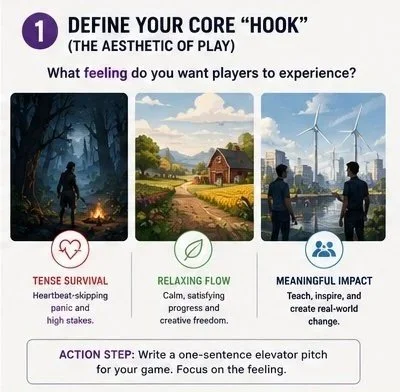
Step 1: Define Your Core "Hook" (The Aesthetic of Play)
Before you write a single line of code or sketch a character, you need to understand what your game is actually about. In game design, we call this the Core Loop or the Aesthetics of Play.
A great game isn't just a list of features; it's an emotional delivery system.
Is your game about the tense, heartbeat-skipping panic of surviving in a dark forest?
Is it about the relaxing, satisfying flow of organizing a digital farm?
Is it a "serious game" meant to teach players about a real-world issue through interaction?
Action Step: Write a one-sentence "elevator pitch" for your game. Focus on the feeling you want to give the player.
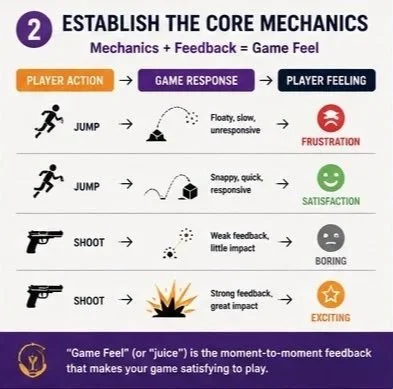
Step 2: Establish the Core Mechanics
Mechanics are the rules, actions, and constraints of your game world. They are what the player can do (run, jump, slide, shoot, talk) and how the world responds.
When you are starting out, keep it simple. The most common first-time mistake is "feature creep"—trying to make an open-world RPG with crafting, multiplayer, and 400 weapons as your first project. Instead, pick one mechanic and make it feel incredible.
What is "Game Feel"?
Even a simple block moving across a screen can feel satisfying. Game designers refer to this moment-to-moment feedback as "juice" or "game feel." If jumping feels floaty, unresponsive, or boring, players will quit before they ever see your beautiful levels.
(For a deeper dive, check out our guide on Common First-Time Game Design Mistakes.
Step 3: Design the Player's Guidance (Affordances)
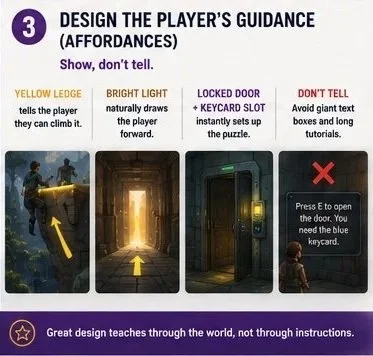
How does a player know where to go? If you have to put a giant text box on the screen explaining how to open a door, you have failed a fundamental rule of design: show, don't tell.
Great game design relies on affordances—visual, auditory, or physical cues that naturally teach the player how to interact with the world.
A yellow ledge tells the player they can climb it.
A bright light at the end of a dark hallway naturally draws the player forward.
A locked door next to a glowing keycard slot instantly sets up a puzzle without a single word of tutorial text.
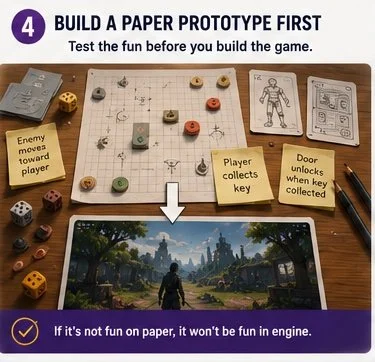
Step 4: Build a Paper Prototype First
Do not open a game engine yet! The fastest way to test if your game is fun is to build it with paper, cardboard, dice, and index cards.
If you are designing a tactical shooter, can you represent the line of sight and cover mechanics on a grid sheet with pennies? If you are making a puzzle game, can you cut out shapes and solve them on your desk?
If your core rules aren’t fun on a tabletop, adding high-end 3D graphics inside Unity or Unreal won’t make them any more engaging.
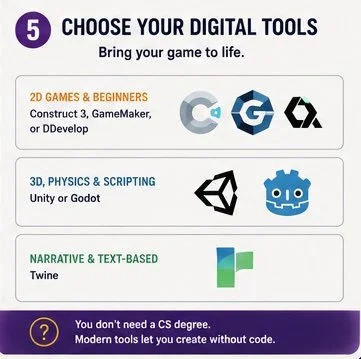
Step 5: Choose Your Digital Tools
Once your paper prototype proves the concept is fun, it's time to bring it to life digitally. Fortunately, you don't need a computer science degree to start. Modern visual scripting tools allow you to construct logic without writing code.
For 2D games & beginners: Construct 3, GameMaker, or GDevelop.
For robust 3D, physics, and scripting: Unity or Godot.
For text-based, narrative, or branch storytelling: Twine.
(Struggling to choose? Read our breakdown of the 10 Free Tools for Beginner Game Designers.
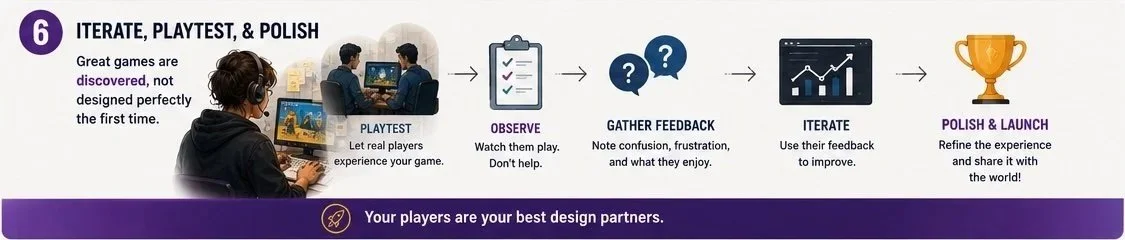
Step 6: Iterate, Playtest, and Polish
A game is never truly designed on paper; it is discovered through playtesting. Show your early prototype to friends, family, and strangers.
Watch them play without saying a word. Do not help them. If they get stuck, make a note: your design didn't guide them effectively. Use their confusion as data to refine your layout, mechanics, and affordances.
Unlock Your Creative Potential
Designing a video game is one of the most rewarding creative journeys you can embark on. It combines art, psychology, logic, and architecture into a single interactive canvas.
To help you skip the trial-and-error phase, we’ve put together a completely free Game Design Starter Course. It contains design templates, brainstorming worksheets, and step-by-step prompts to take your game from a blank page to a working concept in under 30 minutes.